In a typical handheld or mobile FM radio, choosing wide or narrow changes the intended transmit deviation and receive-channel bandwidth. Narrow FM uses a smaller frequency swing and a narrower receiver setting so nearby channels can be packed more closely. The important operating choice is to match the system you are using—not to assume that “wide” means more power or that “narrow” always receives farther.
The terms also appear in SSB filters, digital modes and broadband receivers, where they can mean something different. Start by identifying which setting the radio is actually changing.
Separate the Four Quantities
Channel spacing is the distance between neighboring channel center frequencies. Occupied bandwidth describes the spectrum a transmitted signal uses. FM deviation is how far the instantaneous transmitted frequency swings above and below its center. Receive bandwidth describes the part of the spectrum admitted by the receiver. These are related quantities, not interchangeable names.
A programming screen may label an analog channel “25 kHz” or “12.5 kHz.” The qdmr programming documentation, for example, maps its wide and narrow analog settings to those values. That does not mean that setting a 12.5 kHz tuning step automatically changes the transmitter's modulation. A tuning step determines where the dial can land; a channel's modulation settings determine how it operates there.
A common equipment comparison is approximately ±5 kHz maximum deviation for ordinary amateur FM and ±2.5 kHz for narrow FM; Icom lists those respective values for the IC-T10/S10 FM and FM-N settings. Treat those as familiar equipment examples, not a definition imposed on every ham-radio menu. Check the actual manual: some controls change transmit and receive together, while others address only reception.
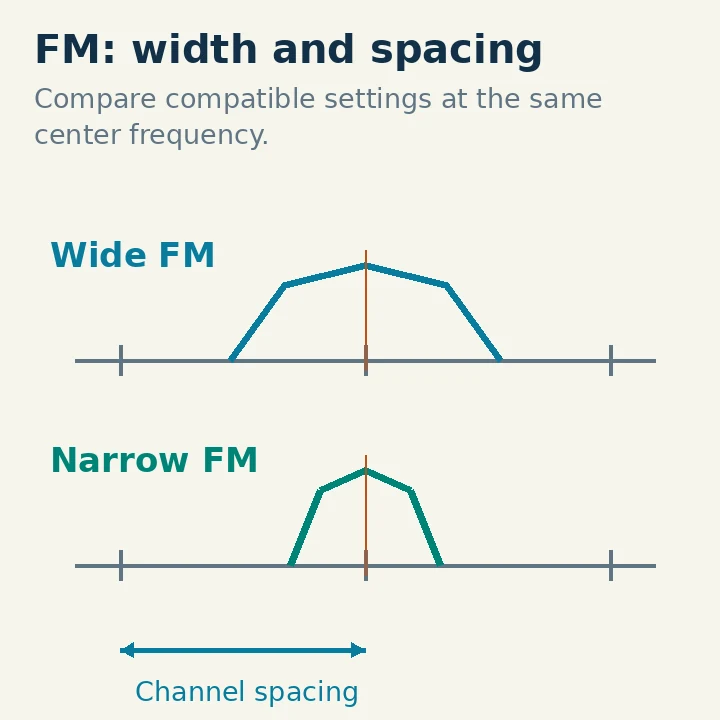
The accompanying frequency sketch separates spacing from signal width. The center markers remain fixed while the narrower signal occupies less horizontal space. Neither width implies a different RF output-power setting.
What Changes When Both Stations Use Narrow FM?
When the transmitter and receiver use compatible narrow settings, the receiver is designed for the smaller deviation. The conversation should sound appropriately modulated without requiring the operator to compensate by shouting. A narrower receive passband can exclude noise and nearby activity that a wider setting admits, although the result depends on the receiver and the actual interference.
There is a tradeoff: reducing the deviation changes the modulation and associated audio/noise performance. You cannot fairly compare two systems by changing only one radio and treating the resulting quiet audio as a sensitivity test. Antenna height, terrain, signal level, squelch and microphone technique can dominate the real contact.
Narrowing also does not solve every interference problem. A signal exactly on your frequency remains inside the receive channel. Strong signals can overload the radio before a later filter has an opportunity to reject them. Selectivity and overload behavior therefore need to be considered separately from the menu label.
A useful beginner conclusion is modest: compatible narrow operation uses spectrum differently; it is not a free range upgrade.
Recognize a Wide/narrow Mismatch
If your transmitter uses narrow deviation while the other receiver expects wide FM, your voice may sound quieter than other users. The other operator can increase speaker volume, but that raises everything delivered to the speaker, including noise. Increasing RF power is not the same correction as matching the expected deviation.
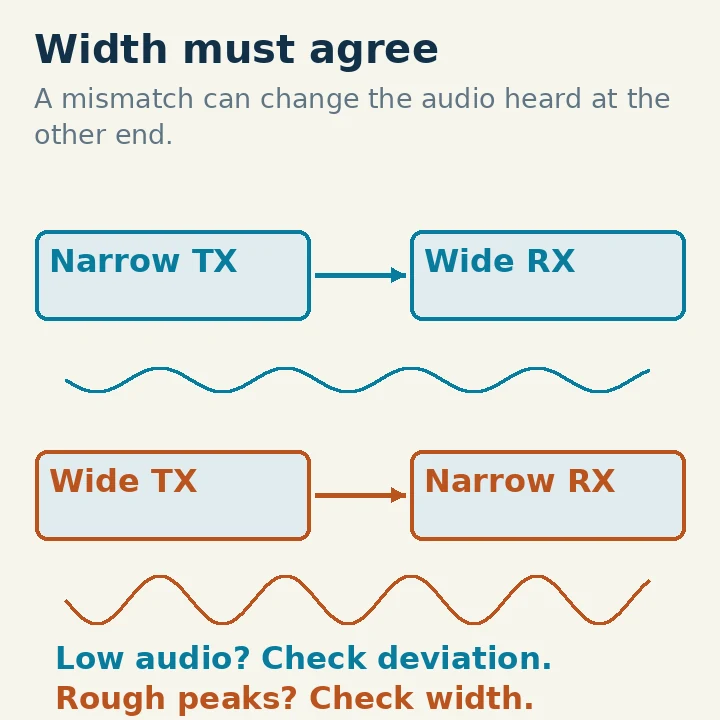
If your transmitter uses wide deviation into a narrow receiver, louder speech peaks may be distorted or clipped by the receiving system. Speaking more loudly can make the problem worse. A repeater can make this confusing because your signal is received at the repeater before being retransmitted to other listeners.
Use this table as a diagnostic starting point, not proof of a fault:
| Transmitter | Receiver | What to investigate |
|---|---|---|
| Wide | Wide | Normal compatible wide-FM baseline |
| Narrow | Narrow | Normal compatible narrow-FM baseline |
| Narrow | Wide | Audio reported low; check deviation settings before raising power |
| Wide | Narrow | Audio rough on peaks; check for excessive deviation |
Weak RF coverage, poor microphone placement, a damaged microphone or a speaker problem can produce overlapping symptoms. Ask for a comparison from someone familiar with the repeater, and change one setting at a time.
Follow the Repeater’s Actual Configuration
A repeater receives your uplink on one frequency and retransmits the audio on another. Before programming a new memory, obtain its current frequencies, offset, access tone or code, and wide/narrow guidance from the operator or club. An old downloadable memory file may retain a previous configuration.
Then inspect the radio's memory-channel settings. Confirm the analog FM mode and the channel width. Check whether that width affects both transmission and reception on your model. Keep the tuning step separate, and verify that the stored transmit frequency is the repeater's input rather than its output.
You can first listen without transmitting. Compare known users and the repeater's own announcements at a comfortable volume. For a transmit check, arrange a brief exchange with a licensed local operator, identify with your own call sign, and ask whether your audio level and clarity are comparable to the regular users. Avoid repeatedly keying the repeater without a useful identified test.
If a radio offers only one of the required settings, do not assume a software label or reduced microphone volume makes it equivalent to a properly configured model. Ask the repeater operator what operation is acceptable before making it your routine channel.
US Rules Do Not Make Every Amateur Channel Narrow
The FCC's land-mobile narrowbanding transition is often quoted outside its scope. The FCC public notice on that transition expressly says it does not apply to the Amateur Radio Service. It concerns particular Part 90 land-mobile operations, not a blanket requirement to set every ham radio to narrow FM.
That does not mean amateur operators can ignore bandwidth. In US FCC jurisdiction, §97.307 requires no more bandwidth than necessary for the information and emission type, and modulation products must remain within the band or segment available to the control operator. Section 97.101 also requires cooperation in channel selection. These rules were checked October 29, 2026.
Technician, General and Amateur Extra licensees have different privileges, although all three can use appropriate amateur VHF/UHF phone segments. A narrow setting does not authorize a frequency or service otherwise unavailable to you. Repeater coordination and local operating practice are additional practical reasons to use the setting expected by that system.
Why the Same Words Mean Different Things Elsewhere
On an HF SSB receiver, “wide” and “narrow” often select receive filters. An SSB bandwidth change may alter the recovered speech and adjacent-channel rejection without changing your transmitted signal. Conversely, a transmit-bandwidth or microphone-audio control affects the signal you send. The IC-7300 manual documents these as separate functions.
On the original IC-7300 specifically, selecting certain FM receive-filter presets also invokes narrow FM transmission. That model-specific coupling is a good reason to read the manual rather than assume every “filter” control is receive-only.
For digital voice, channel width is part of the system design. A DMR repeater uses two alternating time slots within one 12.5 kHz RF channel. Calling that “6.25 kHz equivalent efficiency” does not turn it into a single 6.25 kHz channel or make it interoperable with another digital voice format.
A broadband receiver's “wideband coverage,” meanwhile, may describe the frequency range it can tune across. That is yet another use of the word and says nothing by itself about an individual channel's deviation.
Make a Repeatable Choice
For each memory, record the intended system, analog or digital mode, actual transmit/receive frequencies and required width. Use the documented local configuration as the starting point. Compare audio only after those settings agree, then investigate microphone technique, RF coverage or receiver overload if a problem remains.
If you change a channel experimentally, retain the previous settings so you can restore them. The useful result is a compatible, understandable signal that fits the channel—not a wide/narrow setting chosen once and applied to every band and mode.