Receiver incremental tuning, usually labeled RIT, shifts your receive frequency without shifting your transmit frequency. It lets you make an incoming SSB voice or CW tone easier to copy while continuing to transmit where the other station expects you. The key is to track the offset separately from the main dial.
RIT is useful when a station is slightly off your listening reference. It is not the same as split operation, a receive-filter shift, or a reason to keep retuning while both operators chase one another.
Think of the Dial and Receive Offset Separately
For a simple single-VFO situation with no other offsets active, use this model:
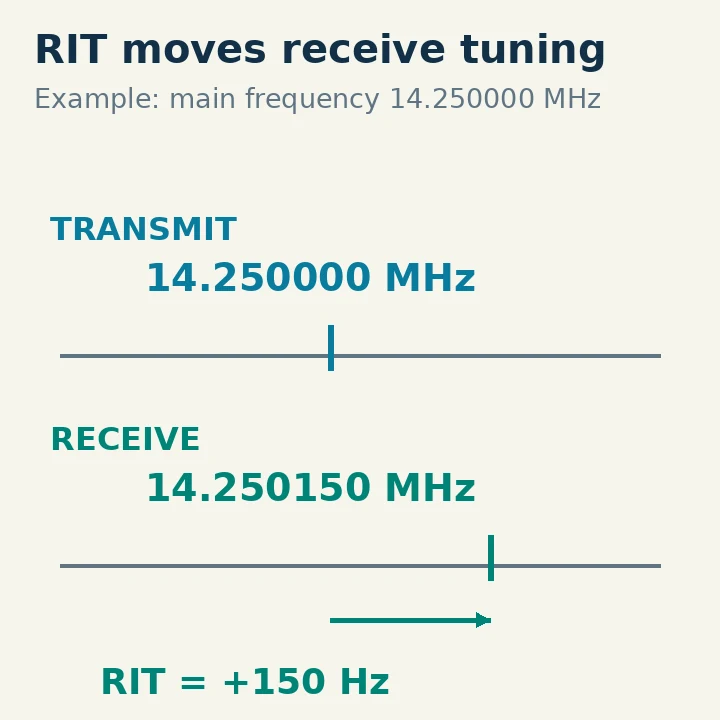
Actual receive frequency = main frequency + RIT offset.
Transmit frequency = main frequency.
Suppose the main frequency is 14.250000 MHz and RIT is +150 Hz. You receive at 14.250150 MHz while transmission remains at 14.250000 MHz. With RIT at −150 Hz, you receive at 14.249850 MHz. These are teaching values; they are not instructions to transmit on a particular channel.
A radio may display the main frequency prominently and show RIT in a smaller field. That is why a display that still says 14.250000 MHz does not prove you are listening exactly there. Check both the RIT on/off indication and the offset value.
For US operation, the 20-meter phone example would require suitable General, Advanced or Amateur Extra privileges; a Technician license does not provide that 20-meter transmit privilege. FCC §§97.301 and 97.305 were checked October 29, 2026. You can explore the receive changes without transmitting.
What Happens to SSB Speech and CW Pitch?
Single sideband, or SSB, reconstructs voice using a local reference in the receiver. A small tuning error changes the recovered voice pitch. RIT moves the receiver's reference while leaving your outgoing frequency alone. Tune until the voice sounds natural, rather than using the offset number as a target.
With Morse code, usually labeled CW on the radio, the received signal becomes an audible tone. RIT can move that tone within your hearing preference or the receive filter. However, a CW pitch or sidetone setting is a separate control: it can change the radio's selected pitch relationship and how the display is referenced. Use the model's CW instructions before assuming a displayed offset describes exactly what another radio would show.
If an incoming station is already clear, leave RIT alone. It is a correction for a particular listening situation, not an extra gain or noise-reduction control. Large adjustments can move the wanted signal out of the filter and make a usable station disappear.
Use a Careful Receive-first Sequence
Begin with the intended main frequency and the correct USB, LSB or CW mode. Turn off split and unintended transmit offsets for the first exercise. Set RIT to zero before enabling it; on some radios, turning RIT off does not necessarily erase the stored value.
Listen to a stable signal. Enable RIT and turn its adjustment a small amount while leaving the main tuning dial alone. In SSB, compare the voice after a few words. In CW, compare the pitch and readability of several characters. Stop at the clearest setting rather than continuing simply because more adjustment is available.
Then switch RIT off briefly. You should hear the difference between the corrected and main-frequency reception. Turn it on again only if that correction actually improves copying. This A/B check also helps catch a mistaken adjustment of another control.
If you transmit during an authorized contact, the other operator should still find you at your original transmit frequency. Do not ask them to “follow your RIT”; it is your receiver's correction. When the contact ends, disable RIT and clear its stored offset before moving to another station.
Original IC-7300 Controls and an Important Long-press Distinction
The original IC-7300 Full Manual describes RIT in its receiving and transmitting chapter. Push RIT to enable it, then rotate the RIT adjustment to align the received station. Push RIT again to disable it. Hold CLEAR for one second to reset the RIT frequency to zero.
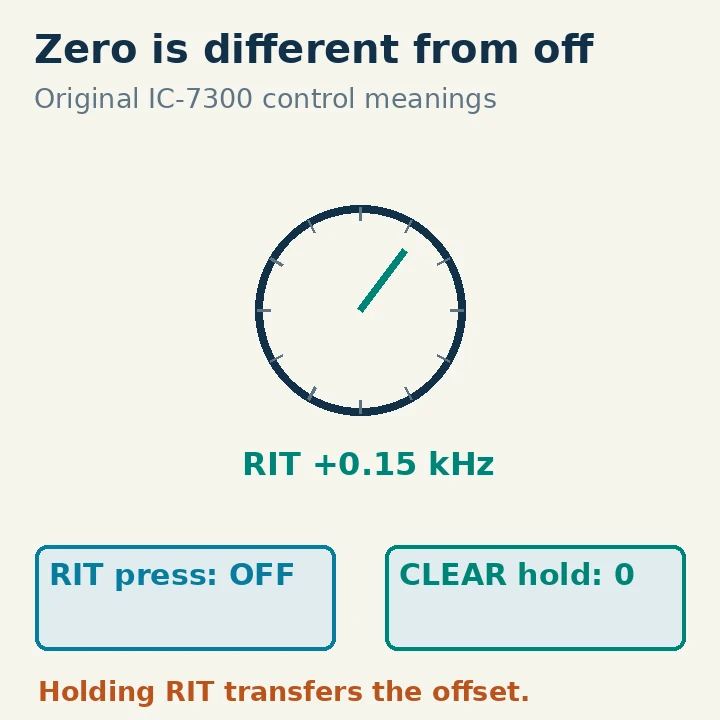
A different long press does something different: holding RIT for one second adds the RIT shift to the operating frequency. That is not the same action as clearing the receive correction. After transferring an offset into the main operating frequency, you must reconsider where the radio will transmit. Avoid that transfer during a beginner exercise unless you deliberately intend to change the operating frequency.
The manual also describes holding XFC while RIT is on to monitor the unshifted operating frequency. In that RIT-monitor state, RIT is temporarily off, and certain receive processing settings are temporarily off too. Consequently, an audible change during XFC monitoring may include more than just the tuning difference.
These gestures apply to the original IC-7300. A radio labeled “Clarifier” may offer receive and transmit clarification separately; verify which functions are active rather than assuming the name means receive-only.
RIT, XIT, Split and Filter Shift
| Control | What it changes | What to verify |
|---|---|---|
| RIT | Receive tuning relative to a main reference | Offset and whether RIT is enabled |
| XIT or transmit clarification | Transmit frequency relative to a reference | Actual transmit frequency and privileges |
| Split | Separate receive and transmit frequency settings | Which VFO supplies each direction |
| IF shift or passband tuning | Position of the receive filter | Wanted signal remains in the passband |
A VFO is a tunable frequency setting retained by the radio. Split often assigns one VFO to receive and another to transmit; RIT can sometimes operate on top of that arrangement. For a new user, adding several offsets before establishing the basic frequencies creates unnecessary ambiguity.
Likewise, shifting a filter can remove interference without correcting a mistuned voice. If the voice pitch is wrong, establish correct tuning first. If the pitch is natural but interference intrudes from one side, the receive filter may be the appropriate tool.
Diagnose the Common Surprises
If two stations cannot seem to agree on a frequency, have one hold its transmit setting steady while the other checks RIT and the main dial. If both operators repeatedly move the main dial to follow one another, the contact can drift unnecessarily.
If an accurately tuned station sounds wrong when you return to it, inspect a remembered RIT offset before assuming the station moved. If your own transmit frequency changed, check for a transferred RIT offset, active XIT, split, software tuning or an accidental main-dial movement. RIT alone is defined as receive-only; the complete radio state still matters.
If a wanted signal vanishes, disable RIT and restore the normal receive width. Then reacquire it with the main tuning controls. Do not increase transmit power to solve a receive-tuning problem.
Record the contact's main operating frequency in your log, adding a note about the receive correction if it helps later diagnosis. Finish with RIT off and zeroed. That small reset prevents a useful correction for one station from becoming a hidden error for the next.