Use the Reverse Beacon Network to find reports of signals received by its automated listening stations. Filter for a band, mode, recent time window and the spotted call sign you want to examine; then read each report as evidence that a particular receiver decoded that transmission at that time. It is a useful way to inspect propagation and your own outgoing signal, not a substitute for listening or a completed two-way contact.
For a beginner, start by watching other stations. Once the display makes sense, a short, lawful CW calling session can show which receivers hear you. You do not need to run a receiving node yourself to use the public display.
Understand Why the Word “Reverse” Matters
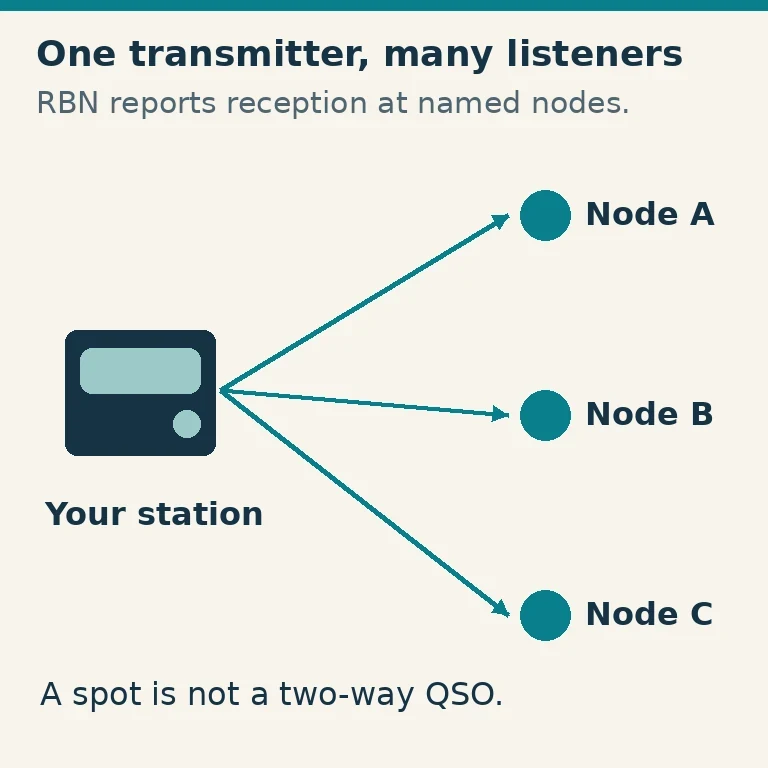
A traditional beacon transmits from a known location and you listen for it. RBN reverses that relationship: distributed receiving stations, often called skimmers, listen for suitable amateur signals and report what they decode. The station transmitting is the spotted station; the receiver reporting it is the spotter.
The direction matters. A report from a node in another region shows that your signal reached that receiver under its operating conditions. It does not demonstrate that you can hear the node, that another amateur is listening there, or that a reply would be equally strong. Receive noise, antennas and station capabilities differ.
Coverage is also uneven. Nodes monitor different bands and may be offline or affected by local noise. A blank patch on the map can mean no suitable receiver reported there. Do not color an entire continent “closed” because the current display lacks a spot.
Set a Small, Understandable Search
Open reversebeacon.net and its current spots display. The guide and public interface were checked October 29, 2026. Begin with one band, one mode and a short recent age window, such as the last ten minutes. This keeps old reports and unrelated activity from obscuring the question you are asking.
Find the fields for Spotter and Spotted. Enter your target transmitter's complete call sign in Spotted and apply the filter with the interface's Enter/Tab behavior. If you put it in Spotter, you are asking for reports made by a receiver of that name, which is a different search. Include a portable suffix if that is how the station actually identifies itself.
Leave the spotter field unrestricted at first. If you simultaneously demand one specific node, band and transmitter, an otherwise working display can legitimately show nothing. Increase the number of displayed rows or age window only after you understand the initial result. Check that the browser's time display and the report's timestamp are being interpreted correctly.
The map is a visual summary of those filters. Lines connect reporting and reported stations; they are not a measurement of the precise ionospheric route. The RBN guide also describes band/mode filters, age/row controls and CW-speed filtering. Speed limits can help a newer CW operator find activity they are more comfortable copying.
Read One Report All the Way Across
Before interpreting a map full of lines, inspect an individual row:
| Field | What to ask |
|---|---|
| Spotter | Which receiving station made this report? |
| Spotted | Is this the complete intended transmitting call sign? |
| Frequency and mode | Are they consistent with the activity you are examining? |
| SNR | What signal-to-noise ratio did this receiver report? |
| Speed | What CW sending speed was decoded, where available? |
| Time/age | Is this a fresh observation or an older record? |
SNR is signal-to-noise ratio. It is not an S-meter reading, absolute transmitter power or a universal station-quality score. A larger value at the same node can be useful in a controlled comparison, but values from different nodes also depend on their antennas, noise and receiver settings. A large SNR difference between two continents does not isolate propagation loss.
Call-sign decoding is automated and can be wrong. Look for repeated, plausible reports rather than treating one unusual call, implausible location or isolated frequency as established fact. A fresh cluster of consistent reports is more informative than a single unexplained row.
Also inspect mode and age before tuning to a reported signal. By the time you get there, the station may have moved or stopped. The right response is to listen on the appropriate authorized frequency, not to assume that the internet display reserves that channel for the spotted station.
Try a Short Test of Your Own Outgoing CW
First check your US license privileges for the intended frequency and emission. Technician HF privileges are limited; an RBN report does not expand them. FCC Part 97 also requires proper identification, minimum necessary power and consideration for other users. This rule check was made October 29, 2026.
Set up your ordinary working station and verify the antenna system before transmitting. Choose a clear frequency in an authorized CW segment, listen, and make normal short CQ calls with your own call sign sent clearly. Do not use a made-up call or someone else's identity to populate the map. Leave listening intervals for an actual response.
Record the time, band, frequency, output setting and antenna used. Then inspect the recent Spotted search for your exact transmitted call sign. Allow for reporting and display updates. If there are reports, compare the timestamps and reporting nodes with your calling interval rather than counting an older session as a new result.
If another operator answers, conduct the contact normally. The purpose of the tool is to inform operation, not encourage a continuous string of test calls while ignoring the receiver. RBN reports themselves are reception observations, so do not log them as two-way QSOs.
Compare Antennas Without Making Propagation the Hidden Variable
An illustrative test might alternate antenna A, antenna B, then A again while holding the same band, output power, transmitter settings and calling style. Record the change times and compare reports from the same receiving node over closely spaced intervals. Repeat rather than making a conclusion from one lucky peak.
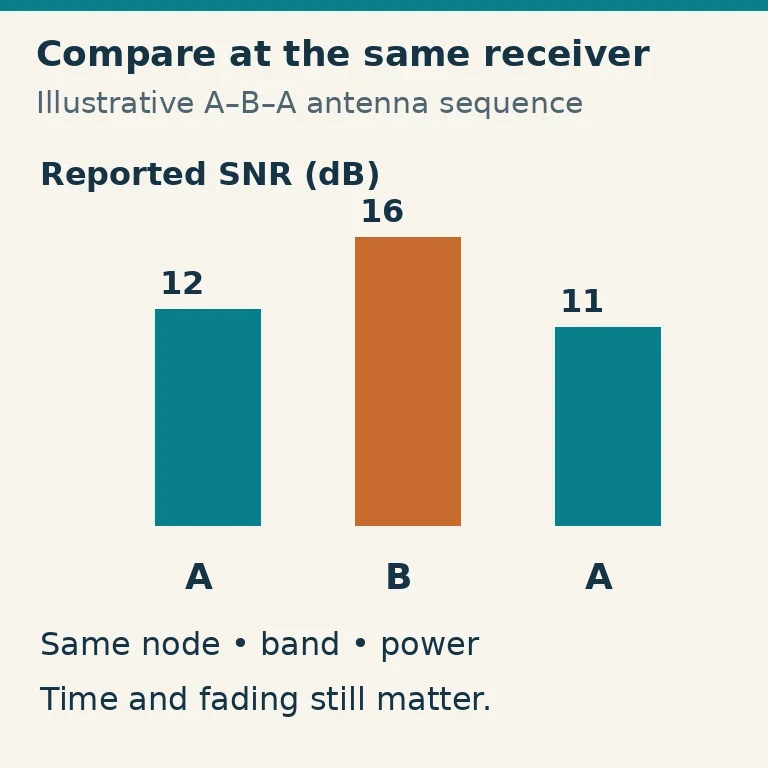
An A–B–A sequence helps reveal a changing path: if the second A result differs greatly from the first, conditions may have shifted during the comparison. It does not remove fading, receiver changes or the effect of a directional pattern. Several well-chosen receiving directions can give a more useful picture than one high number.
Keep the difference between observation and inference explicit. “Node X reported this session 3 dB higher with B” is a bounded observation. “B is 3 dB better everywhere” requires evidence the test does not provide. If power settings changed as well as the antenna, the comparison no longer isolates the antenna change.
Work Through a No-spot Result in Order
First clear unnecessary filters. Confirm the Spotted spelling, full suffix, selected band/mode, age window and row limit. Search a busy known station on the same band to check whether the display has fresh reports at all. If the site reports a query or connectivity error, that is not a radio-propagation result.
Next inspect node coverage. Is there an active receiver monitoring the band in a direction you expect? If a node is absent or not listening there, adding transmitter power cannot make it report your call. Review a broader time window to distinguish a momentary display gap from a persistent lack of observations.
Then check the station itself: correct CW frequency, normal output into the antenna, legible identification and enough calling opportunities for a decoder to recognize it. A poor or drifting signal can fail to decode even when RF is present. Use a local receiving check or experienced operator's help if you suspect a transmitter problem.
Avoid responding to silence with progressively longer, higher-power transmissions. A receive-only check, another suitable time or a different authorized band can be a better next experiment. Save the search settings and your station notes so that the next session tests a specific question rather than starting again with an unexplained empty map.