Noise reduction in an amateur receiver uses digital signal processing to reduce some unwanted noise while trying to preserve the signal you want to hear. It can make a noisy voice easier to follow, but a quieter speaker is not automatically a more readable signal. Judge the result by the words or Morse characters you can copy.
The title's “dynamic noise reduction” describes the adaptive listening task. Manufacturers may label a feature DNR, NR or digital noise reduction, and their algorithms and controls differ. There is no single universal ham-radio DNR setting or circuit that every brand uses. The original IC-7300, for example, calls its feature Noise Reduction and describes DSP processing of random noise.
What the Processor Is Trying to Distinguish
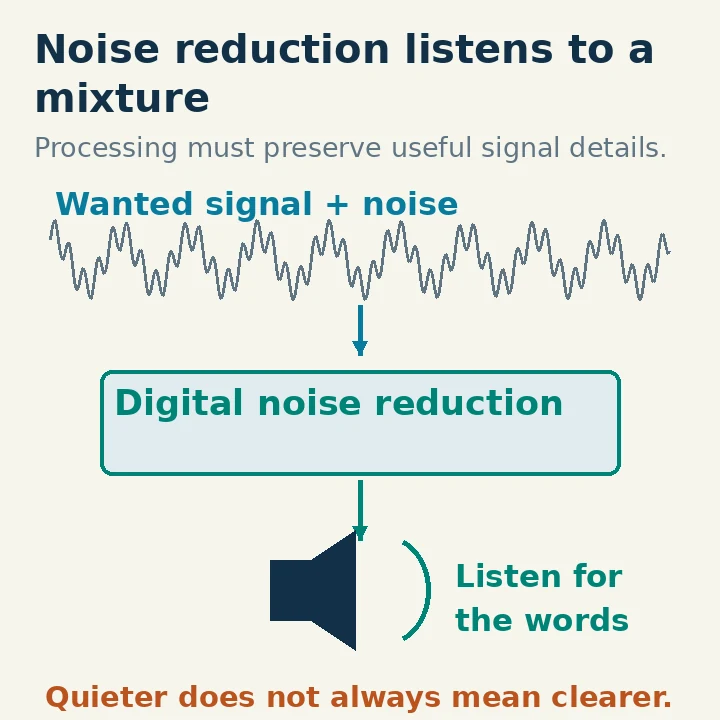
A receiver delivers a mixture of wanted information and unwanted energy. Speech has time-varying patterns; random noise behaves differently. A digital processor can use differences in those patterns to decide which parts of the mixture to attenuate. It must make those decisions from the received mixture, rather than from a separate perfect copy of the voice.
That last point explains the compromise. When a weak syllable resembles the surrounding noise, suppressing the noise can also suppress useful speech. Rapidly changing interference or another person talking over your contact is a different problem from a steady background hiss.
The signal-path drawing shows the conceptual relationship: received signal plus noise enters a processor, and processed audio reaches the speaker. It does not depict a measured before/after improvement or a particular manufacturer's internal algorithm. The operating control adjusts the processor's behavior; it does not increase the signal originally arriving at the antenna.
Digital noise reduction also does not necessarily change the waterfall. The scope may display data from a different point in the receiver. Listen to the result rather than expecting every visible trace to become darker when NR is enabled.
Distinguish Noise Reduction from the Neighboring Controls
A receive filter limits the frequencies admitted around the desired signal. A noise blanker targets pulse-type interference. A notch targets a narrow interfering tone. Automatic gain control, or AGC, manages receiver gain as signal level changes. Digital noise reduction is a different processing task. The IC-7300 manual documents these functions separately.
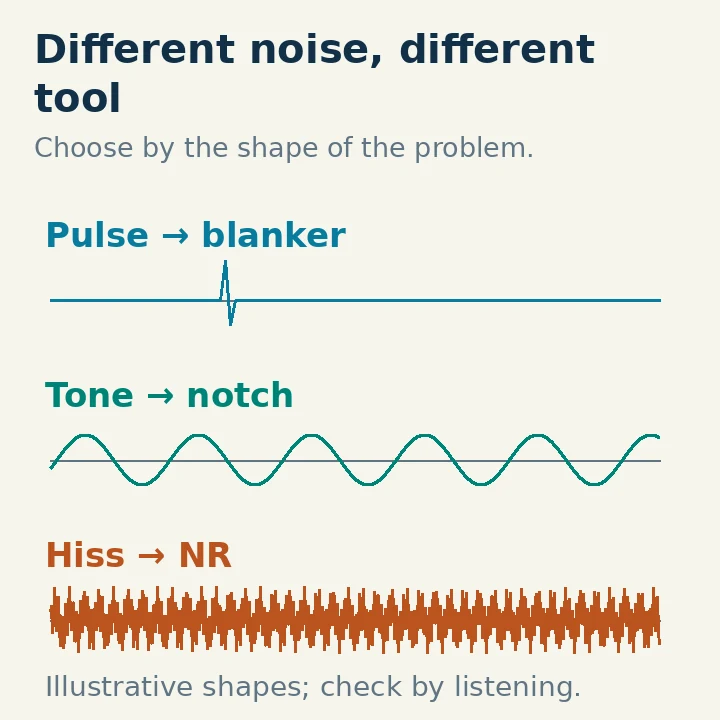
For example, regular clicking from electrical equipment may be a better starting case for a noise blanker than for high NR. A continuous whistle may respond to a notch. Adjacent speech entering at the edge of a wide passband may be reduced by choosing a more suitable receive width or passband position.
None of those choices replaces an overload check. If a strong nearby signal overloads the receiver, later audio processing cannot reconstruct a clean input that was never captured correctly. Follow the radio's preamplifier, attenuation and RF-gain guidance before treating the symptom as ordinary background noise.
The practical order is to tune correctly, choose a useful receive filter, resolve obvious overload, and then compare noise reduction. This gives NR a manageable signal rather than asking it to fix every problem at once.
Set a Clean Baseline Before Comparing Settings
Choose a station you can just about follow through several phrases. Confirm the right sideband and natural voice pitch. Set a comfortable speaker or headphone volume, then leave it reasonably steady during the comparison.
Turn NR off and listen long enough to identify the actual difficulty. Are letters disappearing in hiss, is a whistle masking them, or is another station speaking at the same time? If you cannot describe the problem, it is easy to select the control that makes the sound most pleasant rather than the one that preserves information.
Enable NR at a modest setting. Listen to the same type of material again: call-sign letters, numbers or a full sentence. Increase or change the setting in small steps, allowing enough time to hear the result. Different radios may offer a reduction level, an algorithm choice or both; a higher number is not universally a stronger or better option.
After finding a promising setting, return briefly to NR off. If the unprocessed version is more tiring but the processed version removes important consonants, reduce the processing. If you understand more of the message with NR on, keep the least aggressive setting that gives that benefit.
Adjust the Original IC-7300 NR Control
On the original IC-7300, push NR to turn noise reduction on or off. Hold NR for one second to open its adjustment menu, then adjust the level. The Full Manual specifies a range from 0 to 15 and says higher levels increase reduction. It explicitly tells the operator to reduce noise without distorting the received signal.
This is a level control on that model. It should not be described as fifteen independently documented algorithms merely because another manufacturer's DNR implementation uses that terminology. Nor should a level of 4 in one manual illustration become a universal recommended setting.
Start low enough that speech remains natural, then compare with the feature off. If you lose readability, back off even if the noise floor sounds impressively quiet. When moving to a different signal or mode, repeat the comparison rather than leaving the highest previously useful level active indefinitely. A setting that helps a weak SSB voice should not silently become the baseline for computer decoding.
If your radio uses a different menu or has a separate algorithm selector, use the matching manual. The aim of the procedure remains the same, but the numerical settings and control gestures do not transfer automatically.
Recognize Artifacts and Stop Increasing the Setting
Common descriptions of excessive processing include watery, hollow, metallic or chopped sound. The exact artifact depends on the processor and the incoming signal. The useful observation is whether speech details have become less dependable as you increased the setting.
Try three comparisons: a strong clear station, a weak noisy station and a pause between speech. A setting that makes a pause nearly silent may behave differently once the person starts speaking. Silence during gaps is therefore a poor standalone acceptance test.
With CW, confirm that the wanted tone and timing remain easy to distinguish. An automatic notch can remove a wanted steady tone, so do not confuse a missing CW signal with a need for more NR. With an intermittent signal, also consider AGC recovery and squelch before assigning every gap to the noise-reduction algorithm.
If the interference is another voice occupying the same frequencies, recognize the limit. Ordinary receiver NR is not a reliable way to extract one speaker from every collision. Ask for a repeat, wait for the interference to end, or change frequency by agreement when that is appropriate.
Give Digital Decoders a Separate Comparison
Software that decodes FT8, PSK31 or other sound-card modes interprets the received audio itself. Processing that sounds helpful to a human can alter the signal the decoder needs. For a clean comparison, begin with optional receiver noise reduction bypassed, then judge any change by actual decodes rather than perceived quietness. This is a receive-test method, not a claim that every mode uses the same decoder processing.
Use the application's guidance as the baseline and compare successful decodes rather than perceived quietness. A radio can send USB audio from a different point than its headphone path, so establish whether the NR setting actually affects the audio delivered to the computer. Do not assume a quieter headphone output proves the decoder is receiving the same processed stream.
Keep a short note of the mode, filter width and useful NR setting, including when you turned it off. Effective noise reduction is a conditional receive aid: it earns its place by improving copying in the present conditions, and it should be easy to bypass when it does not.