To connect a DMR radio to a local repeater, program the repeater's receive/transmit frequency pair, color code and time slot, then associate the intended talkgroup with a digital contact and channel. Put that channel in a selectable zone, verify reception, and make a short identified call when the slot is clear.
DMR adds destination and slot settings to the familiar repeater frequency pair. Programming only the frequencies can produce a radio that detects activity but never gives you the conversation you intended. Start with one verified channel rather than an entire regional codeplug.
Obtain the Operator’s Current Channel Information
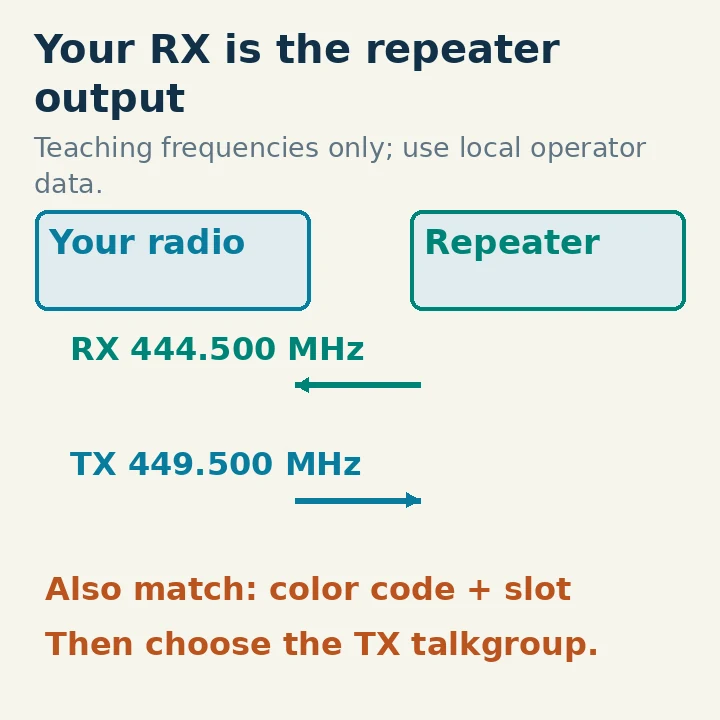
A repeater receives your signal on its input and retransmits on its output. Your radio's RX frequency is the repeater's output, and your radio's TX frequency is the repeater's input. Write both actual frequencies down before working with offsets.
Ask the repeater operator or club for the current DMR configuration. You need its frequency pair, color code, permitted talkgroup/slot combinations, network affiliation and any operating restrictions. Also ask whether the chosen talkgroup is always carried, needs activation, or is intended only for local use.
A directory can locate a candidate, but the operator's current information should settle a disagreement about configuration. Do not assume TS2 is always local or TS1 is always worldwide. Those are common conventions in some examples, not a universal allocation. The same caution applies to a talkgroup number appearing on different networks.
For a teaching example only, imagine an operator supplies: repeater output 444.500 MHz, input 449.500 MHz, color code 3, time slot 2 and local group call 9. These values demonstrate the fields; they do not identify a real repeater or authorize using those frequencies at your location. Replace every field with the actual operator-approved information.
Confirm Your License, Radio and DMR ID
Use a DMR Tier II-capable radio that covers the repeater's band and supports conventional repeater operation. “Digital” in a listing may refer to another format, and a compatible-looking handheld is not proof of Tier II support. Check the exact model and firmware documentation.
In US FCC jurisdiction, a Technician or higher-class amateur control operator can use appropriate 70-centimeter phone frequencies, subject to local and geographic restrictions. The example is not permission to transmit where a repeater is not coordinated or operating. FCC §§97.101, 97.105, 97.301 and 97.305 were checked October 29, 2026.
Obtain the personal DMR ID appropriate to your amateur call sign if you do not already have one. The qdmr manual directs amateurs to RadioID and describes verifying licensed status. Enter your own assigned number, not the number embedded in somebody else's shared configuration. A DMR ID is a network/radio identity; it is not a substitute for your amateur license or required call-sign identification.
Before editing, read and save the radio's current codeplug using supported software and a suitable programming cable. A codeplug is its stored configuration. Preserve a known working backup and record the radio and software versions. Do not begin with a firmware update unless a documented compatibility issue requires it.
Create the Destination Contact First
A talkgroup is a group-call destination. In the programming software, create a digital contact with a useful name, the operator's talkgroup number and the correct call type. For the teaching example, that is a contact named “Local TG9,” numeric ID 9, type Group Call.
Do not enter your personal DMR ID as that contact's talkgroup number. Your radio ID identifies you as the sender; the contact identifies whom you are calling. Also do not choose Private Call merely because the conversation is meant for local users. A group talkgroup remains a Group Call destination.
Some services use a private-call destination for a test or control function. Use such a service only when the operator documents the destination and call type. Guessing an “echo” number from another network can activate an unintended function or fail silently.
The contact name is for your convenience. Its numeric destination and call type determine the signaling. A friendly label saying “Local” does not make an incorrectly entered worldwide destination local.
Assemble One Complete Digital Channel
Create a DMR channel and enter a name that includes the repeater, talkgroup and slot. Then fill the fields from your operator sheet:
| Field | Teaching example | Meaning |
|---|---|---|
| Radio receive frequency | 444.500 MHz | Repeater output |
| Radio transmit frequency | 449.500 MHz | Repeater input |
| Color code | 3 | Must match the repeater |
| Time slot | 2 | Slot carrying the selected destination |
| TX contact | Local TG9, Group Call | Default destination when PTT is pressed |
| Radio ID | Your assigned ID | Sender identity |
A color code is a digital access parameter, not encryption and not an analog CTCSS tone. A time slot selects one of the two alternating communication paths in DMR's 12.5 kHz channel. Frequency, code, slot and destination must work together.
Set reasonable power for the known path, disable VOX for the first test and use a documented transmit timeout. Follow the radio manual and local policy for the transmit-admit or busy-channel setting. Do not use “Always” simply to force a radio to transmit over a condition it is reporting as busy.
Leave encryption/privacy, roaming, automatic location reporting and unrelated features off while establishing the basic channel. Each extra function adds state that can obscure the reason a first test failed.
Add Receive Handling and a Zone
On radios that use an RX group list, include the group calls you want to hear on this channel and associate that list with the channel. At minimum, make sure the selected talkgroup can be received under the model's rules. Some radios automatically include the selected TX contact; others rely more explicitly on the group list. Check the manual rather than assuming another radio's behavior.
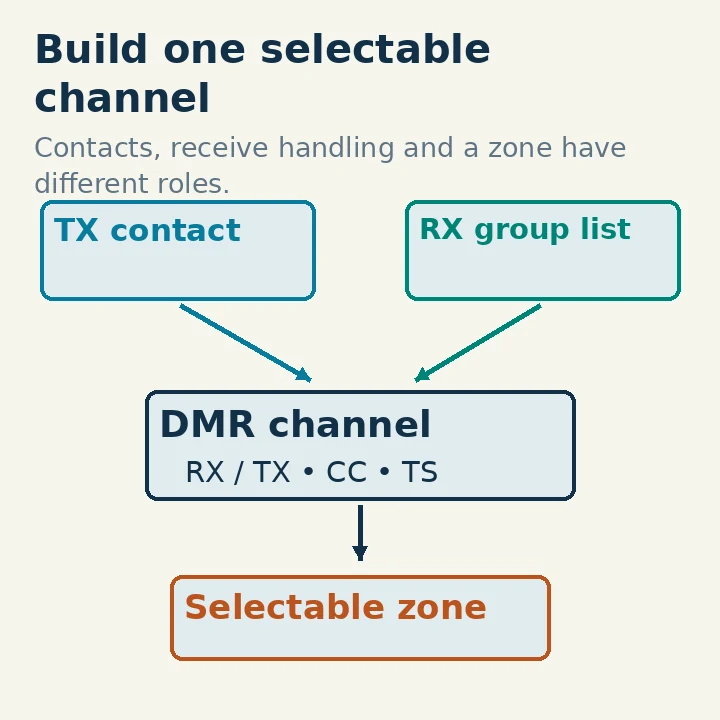
An RX group list does not change your transmit destination. Likewise, loading a huge call-sign database may make received IDs appear as names, but it does not create the channel, assign the repeater's slot or enable the intended talkgroup.
Create a small zone, such as “Home Test,” and add the channel to it. A zone is a selectable collection of channels. The qdmr manual notes that channels not assigned to a zone are often not selectable on the radio. A correctly created channel can therefore appear to be missing simply because it has no accessible zone entry.
Save the edited file, write it to the radio using the supported procedure, then read back or inspect the actual radio settings. Choose the new zone and channel, and confirm that the display shows the intended memory rather than a VFO or old channel.
Before writing the radio, review the channel dependencies in the figure against the saved file. The TX contact must be the intended group-call destination, the channel must reference that contact and the appropriate receive handling, and the zone must contain that channel. Similar names do not establish that the references point to the same objects. Rename duplicate-looking entries so the selected item is unambiguous.
After writing, keep the saved file and a note of what was actually changed. If supported by the programming software, read the configuration back into a separate file rather than overwriting the baseline backup. This can reveal a failed write or a channel edited in a file that was never transferred. If a setting cannot be read back, inspect it through the radio or the software method documented for that model. Do not infer a successful transfer solely from closing the programming window.
Verify Reception Before Your First Call
Turn scanning and roaming off for the first test so the radio stays on the known channel. Listen during a period when local operators expect activity. A signal-strength indication without decoded audio is not proof that all DMR fields are correct.
If you see activity but hear nothing, check color code, slot, receive group handling and whether the traffic is actually the chosen digital mode. A documented digital-monitor function may help diagnose filtering, but it can make you hear destinations you are not configured to transmit to. Use it as a temporary diagnostic, then restore the normal channel before calling.
A quiet channel does not necessarily indicate a programming failure. The selected talkgroup may not be active, the repeater may be idle, or coverage may be marginal. Arrange a short test with a local operator so you know when a response is expected.
For the test, wait until the slot is clear, press PTT, allow the radio to establish its transmission as documented, then give your full call sign and say you are checking access on the named local talkgroup. Release PTT and leave a pause for a reply. Avoid repeatedly keying the system just to make a status indicator appear.
Separate RF Success from Network Success
If a local operator hears you through the repeater but a remote talkgroup does not respond, your local RF configuration may already be working. Investigate the permitted network route, activation rules and slot assignment before changing the frequency pair.
If the radio reports failure to access the repeater, check the radio's TX frequency, coverage, antenna, color code and slot. Moving to a better location may be more useful than repeatedly increasing power inside a poor indoor position. Do not bypass busy-channel protection as a substitute for learning what the indication means.
If reception works but you are sent to the wrong destination, inspect the default TX contact on the actual selected channel. If the channel cannot be selected, inspect its zone membership. If it worked before importing a shared codeplug, verify that your personal ID, frequencies and contact assignments were not overwritten.
After a successful exchange, save a dated copy of the working configuration and the operator information used. Note the test location and whether it verified local repeater audio, network audio or both. Keep the small working channel as a reference while adding more talkgroups. One understood, repeatable connection is a stronger foundation than a long menu of unverified memories.