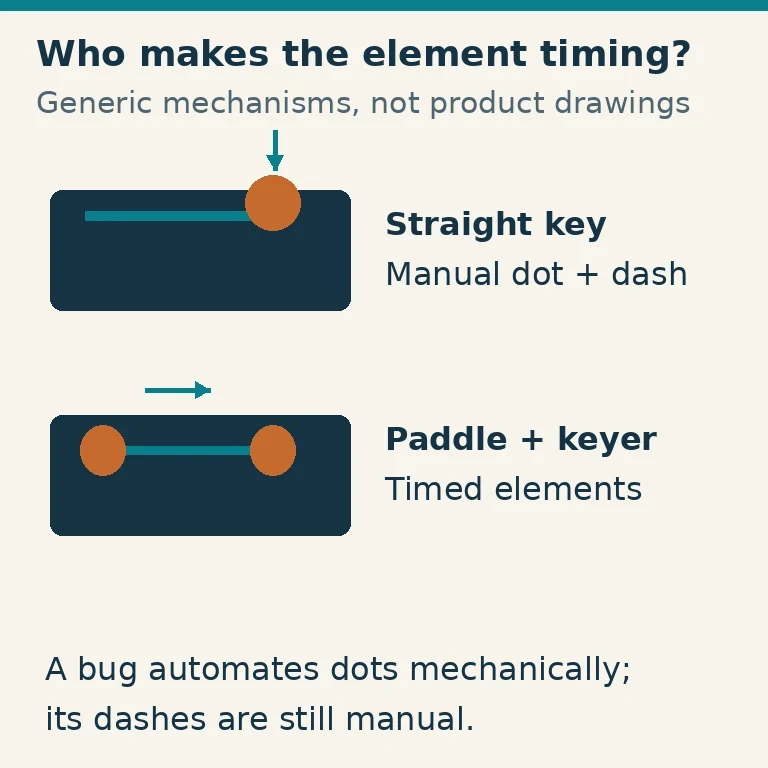
Choose a CW key by deciding how much timing you want to produce by hand and how much you want an electronic or mechanical mechanism to produce. A straight key leaves both dots and dashes to you. A bug produces repeated dots mechanically while you make the dashes. A paddle tells an electronic keyer which elements to generate.
These are different operating methods, not a ladder from beginner to professional. The right choice fits your practice goals, comfortable hand movement and radio's keying input.
Understand the Key, Keyer and Radio
In CW, the transmitter produces a carrier that is switched on and off to form Morse elements. The hand-operated device controls that switching, either directly through a suitable key input or indirectly through a keyer.
An electronic keyer generates timed dots and dashes from paddle commands. It may be built into the radio or supplied as a separate unit. A paddle without a keyer is not automatically a complete source of correctly timed elements.
A straight key or sideswiper normally presents manual contact closures to a compatible hand-key input. A mechanical bug also provides contact closures, but its dot mechanism repeats them automatically. The radio's electronic paddle mode is usually the wrong setting for these devices unless its manual specifies a special arrangement.
Manufacturer categories such as those listed by Vibroplex reflect these distinctions: straight keys, semi-automatic bugs, single-lever paddles and iambic paddles are different mechanisms. Product names alone can be confusing, so inspect how the device actually works.
Straight Keys: Make Every Element Yourself
A straight key has a lever you press, typically downward, to close a contact. You control the duration of every dot, every dash and every space. It needs no automatic element generator, provided the radio has a suitable hand-key input.
That makes the relationship between movement and transmitted sound direct. It is useful for learning manual rhythm and for operators who enjoy that feel. It also means the key does not correct rushed spacing or irregular element lengths.
Use a relaxed posture with the key at a comfortable height and distance. The aim is repeatable movement without gripping, pounding or forcing the wrist into an awkward angle. A heavy base or secure mounting helps prevent the key moving across the table.
Start with moderate contact gap and spring tension according to the maker's instructions. Extremely close contacts and very light tension are not automatically easier for a beginner. They can make accidental closure and uneven timing more likely.
If the movement causes discomfort, stop and adjust the setup or try another mechanism. A straight key is not mandatory before you are allowed to learn paddles, and long uncomfortable practice does not improve technique.
Sideswipers: Manual Timing with Sideways Movement
A sideswiper, often called a cootie key, uses sideways movement to close contacts. The operator still creates the duration of both dots and dashes. It is not the same thing as a paddle connected to an automatic keyer.
A typical sideswiper allows manual elements using either direction of movement. Learning to alternate and space those elements is a distinct skill. Familiarity with a single-lever paddle does not immediately transfer because the timing responsibility has changed.
A sideswiper can suit an operator who prefers lateral motion and manual rhythm. Before choosing one, try a practice setup and listen to the resulting spacing. The unusual movement is a reason to learn it deliberately, rather than to assume it will instantly be faster or more comfortable.
Use the proper manual-key input and wiring for the radio. Do not assume that a device with two side contacts should be plugged into paddle mode simply because the connector has several conductors.
Bugs: Automatic Dots, Manual Dashes
A semi-automatic mechanical key, or bug, uses a vibrating mechanism to generate a train of dots. The operator produces dashes manually on the other side and controls when dot trains begin and end.
It therefore automates only part of the work. You still need good dash timing, element spacing and transitions between the two. A bug can produce distinctive, effective sending, but it does not turn arbitrary hand motion into evenly timed Morse.
Its mechanical dot speed depends on the design and adjustments, including the moving weight. Some bugs do not comfortably reach the very low speed a new operator wants without approved accessories or a different model. Check the usable range before buying.
The manufacturer's adjustment procedure matters. Contact gaps, spring forces and dot mechanism settings interact. Vibroplex's adjustment material describes a sequence rather than treating every screw as an independent speed control. Keep a record of changes and adjust one relevant parameter at a time.
Practice with a suitable oscillator or properly configured radio monitor before transmitting. Do not copy vintage instructions for directly keying high voltage into a modern transceiver input. Mechanical suitability and electrical compatibility are separate questions.
Single-lever Paddles: Electronic Timing Without Squeezing
A single-lever paddle moves one lever sideways. One direction requests dots and the other requests dashes from an electronic keyer. Holding a side normally produces repeated elements at the selected keyer speed.
Because the same lever cannot independently close both sides in the ordinary mechanism, it does not provide the same squeeze operation as independent dual levers. Some operators prefer that deliberate separation and find it helps avoid unintended extra elements.
The keyer sets element timing, but you still control character selection and spacing between characters and words unless a particular keyer offers additional assistance. Very even dots do not compensate for running every word together.
Connect the paddle to the radio's paddle input or an external keyer, then select the correct mode and speed. Check which side generates dots and whether the radio supports paddle reversal. Do not swap connections at random while the transmitter can key unexpectedly.
A single-lever paddle is a practical first choice for someone who wants electronic element timing without learning squeeze techniques immediately. It is also a long-term preference for many experienced operators, rather than a temporary training device.
Dual-lever Paddles and Iambic Operation
A dual-lever paddle has independently movable dot and dash levers. With a compatible iambic keyer, closing both can produce alternating dots and dashes. This squeeze capability can reduce movement for some characters.
It does not require you to squeeze every character. You can operate independent levers with a more deliberate dot-side/dash-side technique. The physical paddle and the electronic keyer's selected behavior are separate parts of the system.
Iambic modes A and B differ in their response to releasing a squeeze. In common implementations, Mode B can add a further opposite element under conditions where Mode A stops after the current element. Release timing and element memory details matter, so consult your keyer's manual rather than relying on the letters A and B alone.
For example, Elecraft's K1 manual provides an iambic mode selection and discusses the difference for that radio. Its menu names, timing behavior and wiring instructions are model-specific, not instructions for every transceiver.
Choose one mode while learning. If extra dots or dashes appear, examine squeeze release and element memory before changing contact gaps or blaming the paddle. Switching keyer modes repeatedly can hide the technique you actually need to practice.
Check Electrical Compatibility Before Plugging in
Identify the input type, connector wiring and keying voltage/current specified by both devices. A stereo plug often serves a paddle, but plug appearance is not a wiring standard for all radios. Some radios have separate paddle and hand-key sockets; others share a socket with menu selection.
An external keyer's output normally connects to an appropriate straight-key input, while the paddle connects to the keyer. Enabling the radio's internal paddle keyer on an already keyed output can produce unexpected timing.
Vintage transmitters may place hazardous voltage or substantial current on the key circuit. Modern electronic keyers and small contacts may not tolerate it. Use a properly specified interface where required and obtain qualified help if the circuit is uncertain. Never determine compatibility by touching an exposed circuit.
Verify transmit inhibition before practice. A sidetone being audible does not prove RF is disabled. Some radios' test or practice modes reset when restarted. Follow the manual and recheck the state before each session, or use a separate practice oscillator.
Compare the Types with a Short Practice Exercise
Use a known practice text and listen to the recording. For standard Morse timing, a dot is one unit, a dash three, spacing within a character one, between characters three and between words seven. Farnsworth practice deliberately expands larger spaces while retaining recognizable element rhythm.
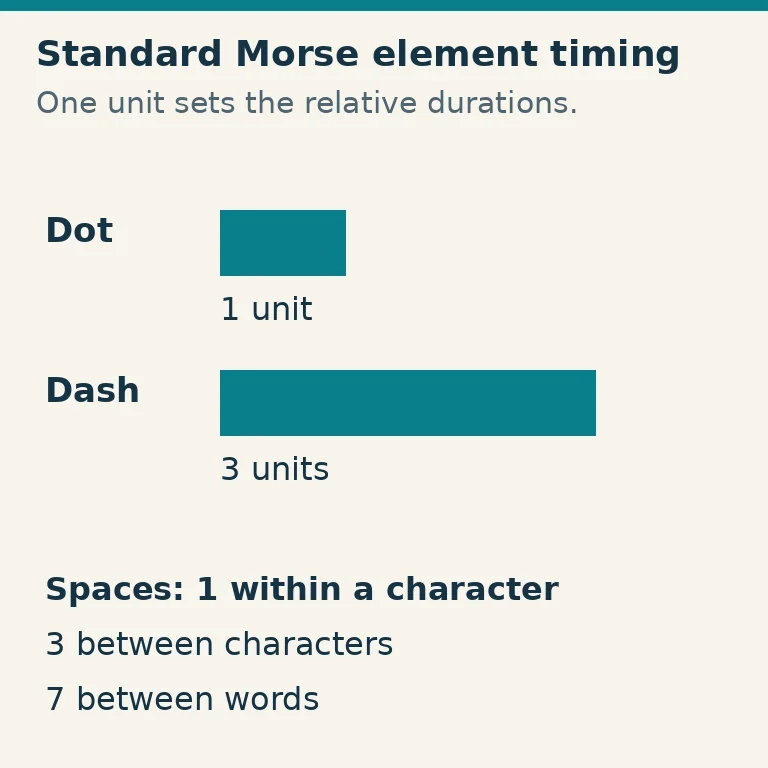
On a manual key, listen for consistent dot/dash proportions. On a paddle, listen especially for character and word spacing and unintended elements. On a bug, check that the manual dashes fit the mechanical dots instead of forming two different rhythms.
Try each device for comfort as well as sound. Consider base stability, hand size, portability and how well adjustments stay put. A delicate low-force paddle may suit a fixed desk while a protected, secure device may be easier to transport.
For an uncomplicated first setup, choose either a comfortable straight key with manual input or a paddle with a compatible electronic keyer. Choose a bug or sideswiper because you want that particular method and are willing to learn it. Clear, relaxed, well-spaced sending is the useful result, whichever mechanism helps you produce it.