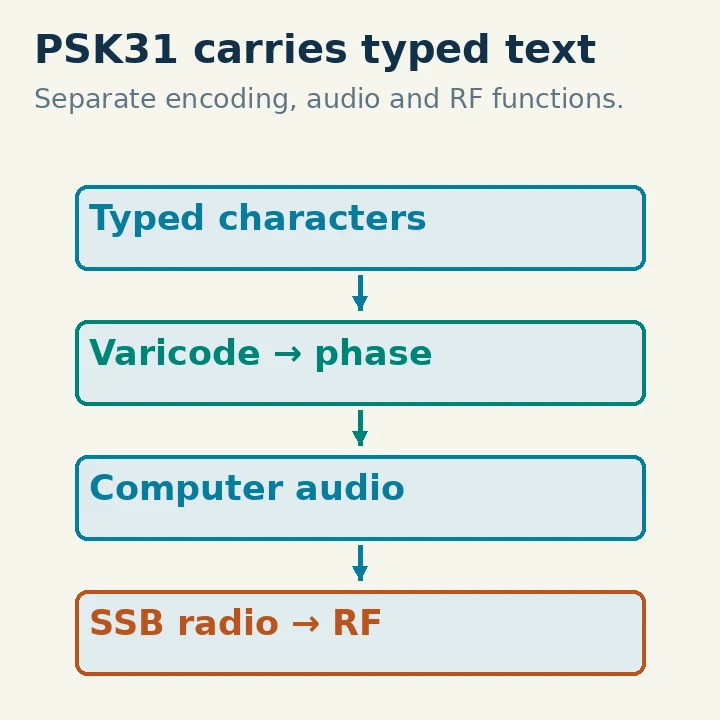
PSK31 is a narrowband digital text mode that sends typed characters over amateur radio by changing a carrier's phase. In the common BPSK31 form, symbols are sent at 31.25 baud, and a variable-length character code turns ordinary text into the transmitted bit stream. A computer sound interface and an SSB transceiver can perform the encoding and decoding.
Unlike FT8's short structured exchanges, PSK31 is suitable for an actual typed conversation. You can exchange a call sign and report, then discuss your station in ordinary text. Clean audio drive, accurate tuning and patient turn-taking are more useful than a large automatic macro sent to every person you contact.
Follow a Character from Keyboard to Antenna
When you type a character, the software represents it using Varicode, a code in which common characters can use shorter bit sequences. Character separators let the decoder recover the text boundaries. The original PSK31 article by Peter Martinez, G3PLX, explains why this arrangement supports conversational typing without giving every letter the same fixed-length code.
The bit stream controls the phase of an audio-frequency carrier. In differential binary PSK, the receiver looks for the relationship between successive symbol phases. It does not need the transmitter and receiver to share an absolute phase reference across the radio path.
The sound interface sends that audio waveform to the radio's SSB transmit-audio input. The radio translates it to RF. At the receiving end, another SSB receiver recovers audio, and software detects the phase changes and converts the code back to text.
That is why the practical station has separate jobs: audio carries the modulation, PTT keys the transmitter, and optional CAT controls frequency or mode. A successful CAT connection alone does not prove that any PSK audio is reaching the transmitter or decoder.
What 31.25 Baud Means
Baud is a symbol rate: 31.25 symbols per second here. It is not 31.25 words per second. The useful typing throughput depends on character coding, the text itself and overhead. Varicode makes common lower-case text efficient, while a message with many less-common characters can take longer.
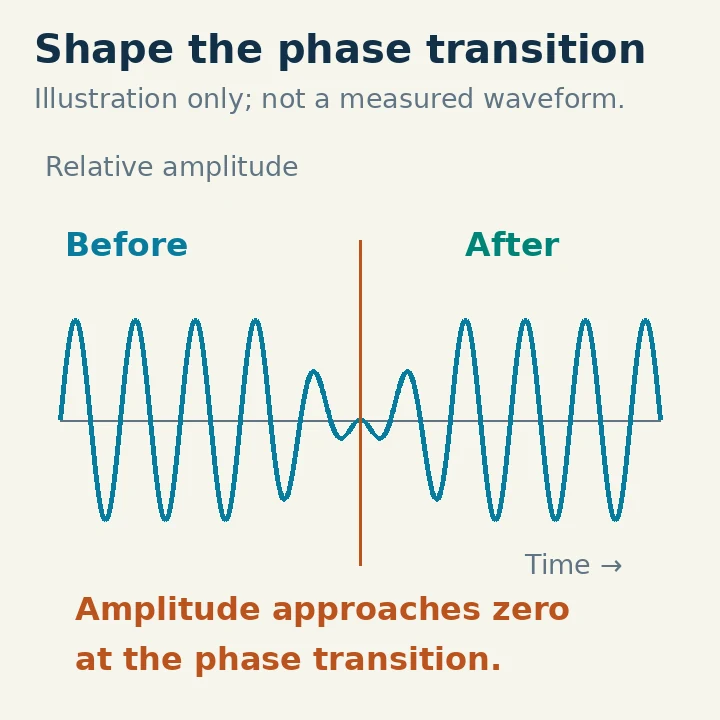
The original design discusses a theoretical narrow bandwidth related to that symbol rate. In practice, signal shaping and clean linear transmission matter. Do not treat “31” in the name as permission to ignore a visibly broad or distorted signal.
The original article describes reversing carrier polarity for the relevant symbols. The fldigi documentation further describes raised-cosine amplitude shaping, reducing the signal toward zero at a phase change to keep the transition spectrally controlled. Abruptly switching a constant-amplitude waveform is not a complete description of the transmitted PSK31 signal.
The phase illustration separates a symbol boundary from the surrounding waveform. It is a teaching diagram, not a measured trace from a station.
BPSK31 and QPSK31 Are Different Choices
BPSK uses two phase states. QPSK uses four and can include error-correcting coding in the PSK31 family. The added coding does not mean QPSK31 always produces a better HF contact. The fldigi manual discusses the limited coding/interleaving behavior and sensitivity to propagation-related phase changes.
For a beginner trying to read ordinary BPSK31 activity, select the actual BPSK31 mode rather than a similarly named faster or multi-carrier variant. PSK63, PSK125 and robust multi-carrier modes have different rate and bandwidth characteristics. They are not simply alternate menu names for PSK31.
If a narrow trace produces no readable text, check the selected mode and tuning before assuming it is encrypted or that the other station has a bad signal. Several digital modes can appear as narrow activity on a wide waterfall.
Build a Receive-first Station
A practical starting arrangement is a supported computer running fldigi or another documented PSK31 application, a receiver capable of the appropriate SSB mode, and an audio path from radio to computer. For later transmission, add the correct computer-to-radio audio path and PTT interface.
Select the actual audio input in the application. Keep the program in receive mode and disable automatic transmit actions while checking it. Use a sensible SSB receive passband so the software can see nearby signals; the software's own selected decoding position is narrower than that overall receiver passband.
Set the receive level high enough to show the signals without clipping. A crowded waterfall is not proof that the computer input level is correct. Establish normal tuning and avoid aggressive receive processing until you know how it affects decoding. fldigi's beginner guide describes the separate receive-audio and transmitter-adjustment tasks.
For US operation on a typical HF data segment, confirm the control operator's band and mode privileges. General, Advanced and Amateur Extra operators have appropriate data privileges on bands such as 20 meters; Technicians do not have 20-meter transmission privileges. Other authorized bands and segments can permit Technician data operation. FCC §§97.301, 97.305 and 97.307 were checked October 29, 2026.
Tune the Software to a Signal
Use the receiver's correct sideband and tune the intended activity into its passband. In the application waterfall, select a distinct PSK31 trace and let the decoder settle. Adjust the software's audio-frequency position carefully rather than moving the radio's main dial every time you choose a nearby signal.
If the application provides AFC, automatic frequency control, use it within the documented acquisition range. AFC can help follow a small frequency error; it is not a substitute for selecting the right signal or the correct mode.
Read several words before deciding the setup works. Random characters can arise from tuning error, wrong mode, fading, noise or interference. A brief sensible-looking fragment does not prove the whole message was decoded correctly. Ask for a repeat rather than filling in missing call-sign characters from expectation.
Keep the radio dial and software audio offset separate in your notes. With USB, a signal's RF frequency is above the dial reference by the relevant audio offset. If you later change the dial, your previous audio-frequency position may no longer represent the same RF signal.
Transmit Cleanly Rather Than Loudly
PSK31 depends on a linear transmit chain. The fldigi beginner guide emphasizes linearity for PSK modes, and the original mode design relies on its controlled waveform. Overdriving a sound interface, microphone input or transmitter can undo that shaping and produce unwanted energy around the signal.
Turn off speech compression and avoid unnecessary transmit equalization or effects. Select the radio's documented data-audio input if appropriate. Keep computer notification sounds away from that output so they are not mixed into a live transmission.
Begin with conservative RF power and audio drive. Follow the radio's documented audio/ALC procedure and the application's setup instructions; do not copy a universal microphone-gain percentage. The software output slider is not a calibrated wattmeter. Verify actual RF output with appropriate station indications and respect the radio's permitted digital duty cycle.
An unattended long macro can transmit much longer than a spoken sentence. Watch the TX state and temperature, and know how to stop both the software and radio. If the output becomes distorted, unstable or unexpectedly broad, stop and correct the chain rather than raising power.
Inspect any transmit macro before using it on air. Replace placeholder call signs, reports and station details with your own actual information, and remove unnecessary long equipment lists. Make sure its final action returns to receive if that is the intended sequence. A macro is a convenience for sending text; it does not verify that the destination is correct or that the other station acknowledged it.
Make the First Exchange Readable
Listen and decode the existing traffic before calling. Choose a clear audio-frequency position that keeps your entire emission in the authorized segment. Identify with your own call sign and keep the first CQ or reply short.
When answered, exchange both call signs, an honest report and a brief introduction. If part of the text is missing, request the specific information again. PSK31 does not automatically retransmit every damaged character or establish that the other person received your entire paragraph.
Use lower-case ordinary text where appropriate. The fldigi beginner guide notes that the character coding of PSK31 favors lower-case text and that excessive capitals are slower to send. Keep call signs and required information clear, but do not turn the whole conversation into a block of capitals or decorative symbols.
End with an understandable acknowledgment, your identification and a return to receive. Log the contact you actually completed, including time, band and mode. Save a small known-working configuration before experimenting with faster variants or more elaborate macros. The satisfying part of PSK31 is the exchange of readable text; the narrow trace is only the transport.