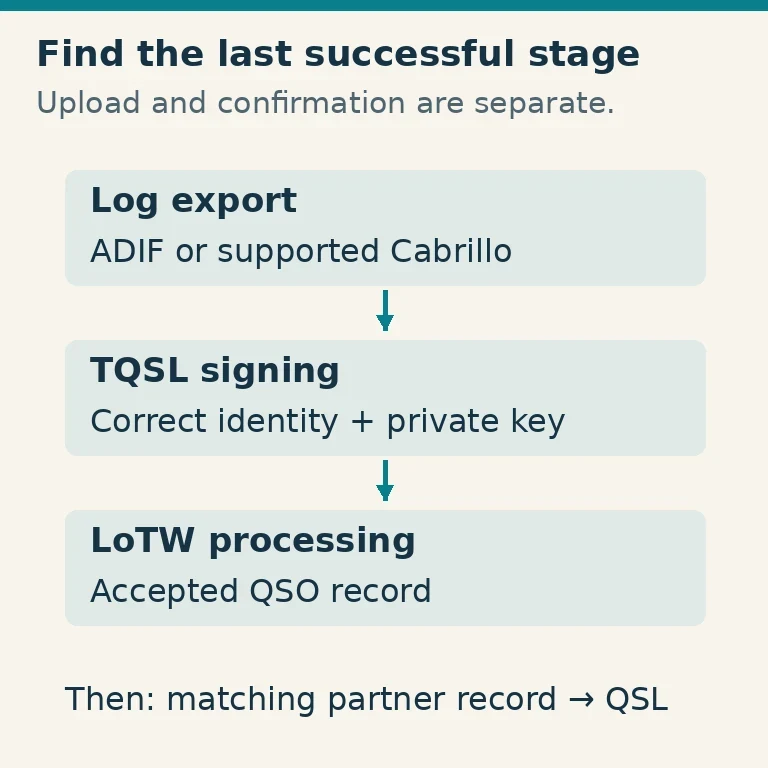
A missing LoTW confirmation does not necessarily mean an upload failed. Your logging program must first export the right contacts, TQSL must sign them with the correct station identity, the signed file must reach Logbook of The World, and the server must accept the records. A confirmation appears only when the other station submits matching information.
Find the last stage that actually succeeded before changing anything. That approach avoids unnecessary certificate replacements, repeated uploads and accidental changes to otherwise correct logs.
First Identify Which Stage Failed
Keep the complete message from TQSL or your logging program, including its date, time and record counts. “Upload problem” is too broad to diagnose. A certificate error, a duplicate warning and an accepted record without a QSL require different actions.
| Evidence you have | Stage to investigate |
|---|---|
| Logger did not produce the expected contacts | Export selection and log data |
| TQSL cannot sign the file | File format, certificate, station location or QSO dates |
| Signing succeeds but transfer fails | Network, service availability or authentication |
| Transfer succeeds but contacts are not visible | Server processing and accepted-QSO search |
| Contact is visible but unconfirmed | Matching information and the other station's submission |
LoTW's official troubleshooting and submission instructions distinguish these stages. Use them alongside the exact error, rather than applying a fix intended for an unrelated operating-system version.
Before substantial changes, back up the logging database and TQSL configuration using their supported backup procedures. Preserve the original export and status messages. A backup taken after deleting the needed certificate is not a substitute for one taken beforehand.
Check the Export Before Blaming the Upload
Export a small, known set of genuine contacts to ADIF when troubleshooting a normal station log. Confirm that the export includes the expected count and dates. A logger may export only selected rows, only contacts marked “not uploaded,” or a date interval you set months earlier.
Open a copy with the logger or a suitable text viewer if necessary. ADIF is a structured exchange format, not a spreadsheet renamed with an .adi suffix. Cabrillo is supported for specified contest formats, but an unsupported or malformed contest header can introduce another variable. For a general log, a correctly produced ADIF export is often easier to inspect.
Check the contacted callsign, UTC date and time, band, mode and station identity. A local-time conversion can change both the hour and the calendar date. Do not “correct” the time to match your current time zone if the logger already stored UTC correctly.
Preserve portable suffixes and operating identities as actually used and required. A lookup program's preferred spelling does not override what happened on the air. If an export appears wrong, repair the master log from trustworthy records and export again; otherwise the next synchronization may restore the same error.
Check the Certificate and Station Location Together
TQSL uses a Callsign Certificate to digitally sign contacts. Its Station Location describes the operating identity and location associated with those contacts. A valid certificate for your home callsign does not make an incorrectly selected location suitable for a trip, another entity or a different station identity.
Select the location representing where the contacts were made, then check the associated certificate. Official help identifies expired, deleted and invalid certificates as separate signing blockers. Follow the corresponding renewal, recovery or replacement procedure. Do not delete all certificates as a first troubleshooting step.
Two different date questions matter. A certificate has a validity period for signing, and its QSO date coverage determines which historical contacts it can represent. An active certificate can still reject a contact outside its permitted QSO dates. Correct an erroneous log date, but do not change a real historical contact merely to fit the certificate.
If you changed callsigns, retain the identities needed for old contacts. Those contacts remain under the callsign used at the time. A new vanity call does not retroactively rename years of QSOs.
An old computer may hold the private key needed by a certificate that appears incomplete on a new one. A certificate request or response file alone is not necessarily a complete recovery package. Use official TQSL backup/recovery instructions; the help pages identify .tbk backups and .p12 certificate containers as recovery routes. Protect private-key material and do not attach it to a public support post.
Separate the Passwords and Credentials
Your LoTW account login, a certificate's private-key password and other service credentials are different things. A successful website login does not prove that TQSL can unlock a password-protected signing key.
Read which operation requested the password. If signing fails before any transfer, investigate the certificate and key. If signing completes but the server rejects account authentication, investigate the upload credentials. Changing the wrong password can make a second application stop working while leaving the original fault unresolved.
When a logger launches TQSL automatically, compare its configured executable, station location and arguments with a manual TQSL attempt using the same small export. A manual success narrows the fault to the integration or its settings; it does not justify reinstalling the whole radio computer.
Avoid repeated guesses against an account. Use the appropriate official recovery process if the credential is genuinely unknown. Keep passwords, certificate containers and private keys out of screenshots shared with a club or forum.
Read Duplicate and Partial-error Messages Carefully
TQSL checks contacts before signing and can identify records it has already processed. A duplicate warning often means the export contains unchanged contacts previously submitted. It is not evidence that those contacts were rejected by LoTW.
The submission instructions describe choices to exclude duplicates, cancel or allow duplicate submission. The exact choice should match your purpose. For routine new contacts, exclude unchanged duplicates and investigate the remaining records. Repeatedly forcing the entire log through does not create missing confirmations.
A file can contain both usable and erroneous records. Note whether TQSL continued with valid contacts or canceled the whole operation, and read the final counts. “One error” does not tell you whether the other 99 records were sent.
After correcting errors in the master log, export the affected records again. Do not simply change the logger's “uploaded” flag to make a warning disappear. That flag may track the logger's attempted submission rather than the server's acceptance.
Keep the original status log with the corrected submission record. Together they show which contacts need another attempt and which already passed the signing stage.
If Signing Succeeds but the Connection Fails
Check LoTW's official service or queue status before repeatedly retrying. A service interruption and a busy processing queue require patience, while a local network failure requires local diagnosis. The help pages specifically distinguish LoTW being unavailable from the computer being unable to reach the internet.
Test ordinary internet access and the computer's date and time. An incorrect clock can affect secure connections. A captive portal, changed firewall policy, managed network or security product may also interfere with TQSL while the browser appears to work.
Keep secure certificate verification enabled. If an error mentions a certificate chain or inspection proxy, retain its exact wording and seek current TQSL guidance or your network administrator's help. Broadly disabling security tools or copying an old operating-system workaround can create a new problem without fixing the actual one.
If direct upload cannot complete, TQSL can prepare a digitally signed file for the supported submission path. Follow the official instructions for that file type. Uploading raw ADIF to a form that expects a signed submission does not bypass signing requirements. Keep the signed file and receipt together so a later retry uses the intended contacts.
If the Upload Was Acknowledged but Contacts Are Missing
A transfer acknowledgment is evidence of receipt, not necessarily immediate processing. Check the queue and allow processing before interpreting an empty search result as failure.
Then search accepted QSOs in the LoTW account using one known contact, a sufficiently broad UTC date interval and the correct station identity. A narrow search filter can hide a record that is present. Compare the server's accepted count with the TQSL status log and your export count.
If the expected contact is absent after processing, inspect rejection or processing details. Determine whether it was skipped locally, excluded by a date range, rejected for data problems or submitted under another location. Re-export only after identifying the discrepancy.
For support, provide the software versions, exact error, submission time, relevant counts and a minimally necessary example. Remove credentials and unrelated personal information. State whether the record is absent from accepted QSOs or merely lacks a QSL; that distinction changes the investigation.
If the Contact Is Accepted but No QSL Appears
Stop treating this as an upload fault. LoTW confirms contacts by matching both stations' submissions. Your partner may not use LoTW, may upload later, or may have different information recorded.
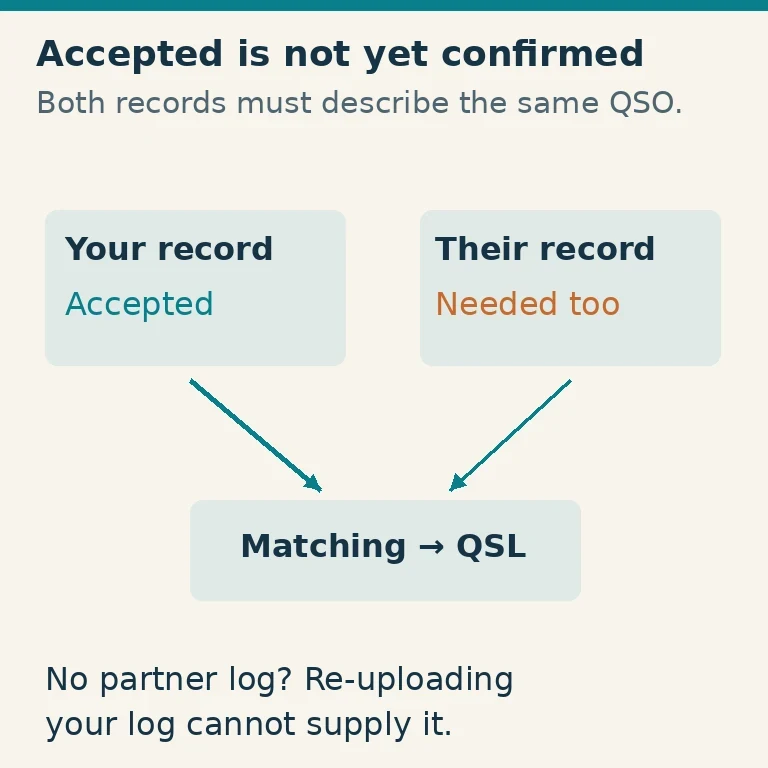
The official “not confirmed” help describes the Find Call activity lookup. Recent activity indicates that a station has uploaded something, not that it uploaded your particular contact. Compare the actual callsign, UTC date/time, band and mode with your original records, then contact the other operator courteously if needed.
Do not manufacture a match by guessing a different date or band. Correct genuine errors using the official submitted-QSO correction procedure and trustworthy evidence. Award credit is also a separate step from acceptance or confirmation; a visible QSL does not prove every award account has already been updated.
A resolved upload problem leaves a clear trail: the correct export, successful signing, a transfer acknowledgment and the expected accepted records. A missing partner confirmation can remain unresolved without any fault in your upload process.